
Web Editor
Open teezeit.github.io/wiremd/editor in Chrome, Edge, or Safari — no install, no account, no setup.
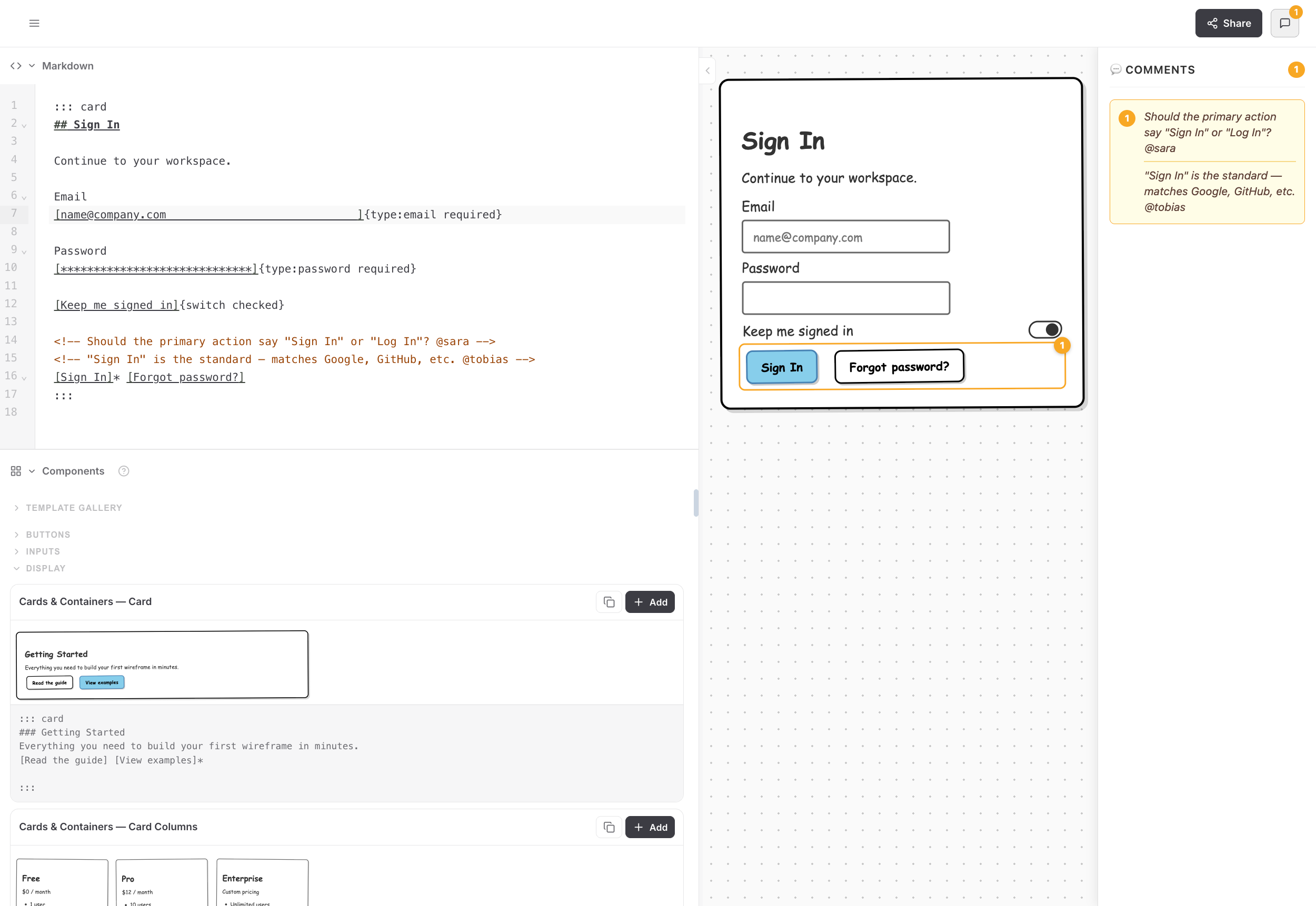
Write or paste wiremd Markdown
Type directly in the editor, or ask Claude to write wiremd Markdown for you and paste it in. Pick a style — the wireframe renders instantly.
Share via URL
Click Copy Link — the editor encodes the current wireframe into the URL. Paste it anywhere: Notion, Jira, Slack, email. Anyone who opens the link sees the rendered wireframe.
https://teezeit.github.io/wiremd/editor/#code=MTAEBEEMGcAsCMD2kBOATAUBgXL0BzFASzQF…Live sync with Claude Code or Claude Desktop
If you have Claude Code or Claude Desktop running on the same machine, Claude can write directly to a .md file and the editor will sync live — no copy-pasting needed. This is Mode 2 in the Claude guide.
Browser compatibility
The editor works in Chrome, Edge, and Safari 16.4+. Firefox is supported for editing and sharing via URL, but live file sync requires the File System Access API which Firefox doesn't support.