
Using wiremd with Claude
Three modes — pick based on what you want to see:
| Mode | What you see |
|---|---|
| display | HTML wireframe as an artifact in Claude's panel |
| editor | Live browser tab — Claude and the editor both read/write |
| serve | Local dev server at localhost:PORT — any browser |
Run /wireframe and Claude will ask which mode you want before doing anything else.
Rendering requires CLI execution — wiremd works fully in Claude Code and Claude Desktop Cowork. Chat-only contexts can write wiremd Markdown but cannot render it.
Claude Code:
npx skills add teezeit/wiremd/extensions/skillsClaude Desktop Cowork: download wireframe-skill.zip → Settings → Plugins → + Add → Upload (.zip) (recommended), or Settings → Skills → + Add → Upload (.zip).
Mode 1 — Only Claude
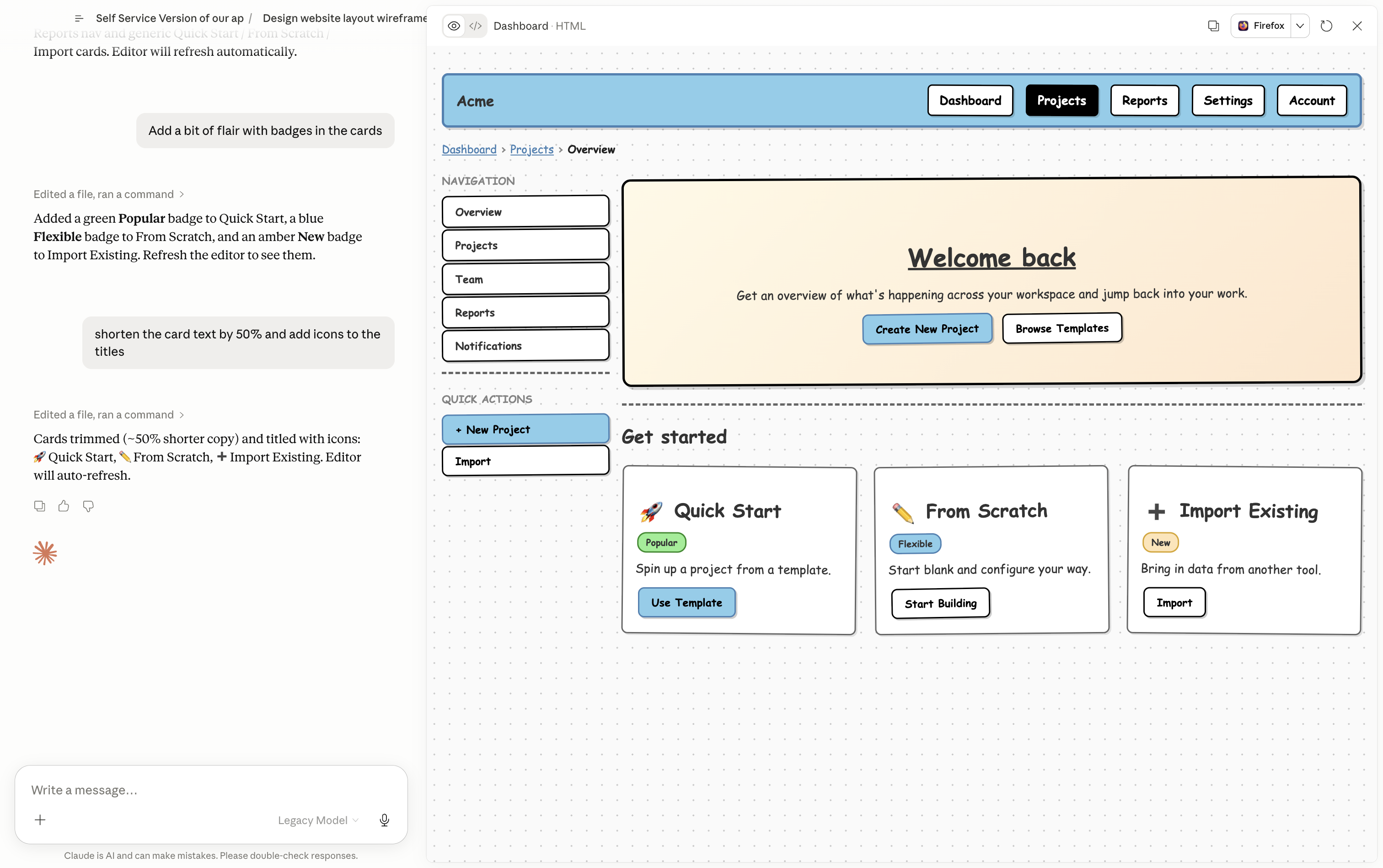
Select display when Claude asks for a mode. Claude writes the .md file, runs the bundled wiremd CLI to render HTML, and shows the result as an artifact in its panel. No browser tab, no manual refresh.
Works on Claude Desktop, claude.ai, and Claude Code.
How it works
- Describe the screen you want
- Claude writes
wireframe.mdand renders it:bashwiremd wireframe.md -o wireframe.html -s sketch - The rendered wireframe appears in Claude's panel
- Give feedback — Claude edits the
.md, re-renders, panel updates
What you can ask
- "Wireframe a settings page — profile, notifications, billing tabs"
- "Add a sidebar with navigation and show the active state on Overview"
- "Show the empty state for the table — no data yet, with an Add button"
Mode 2 — Claude + Editor
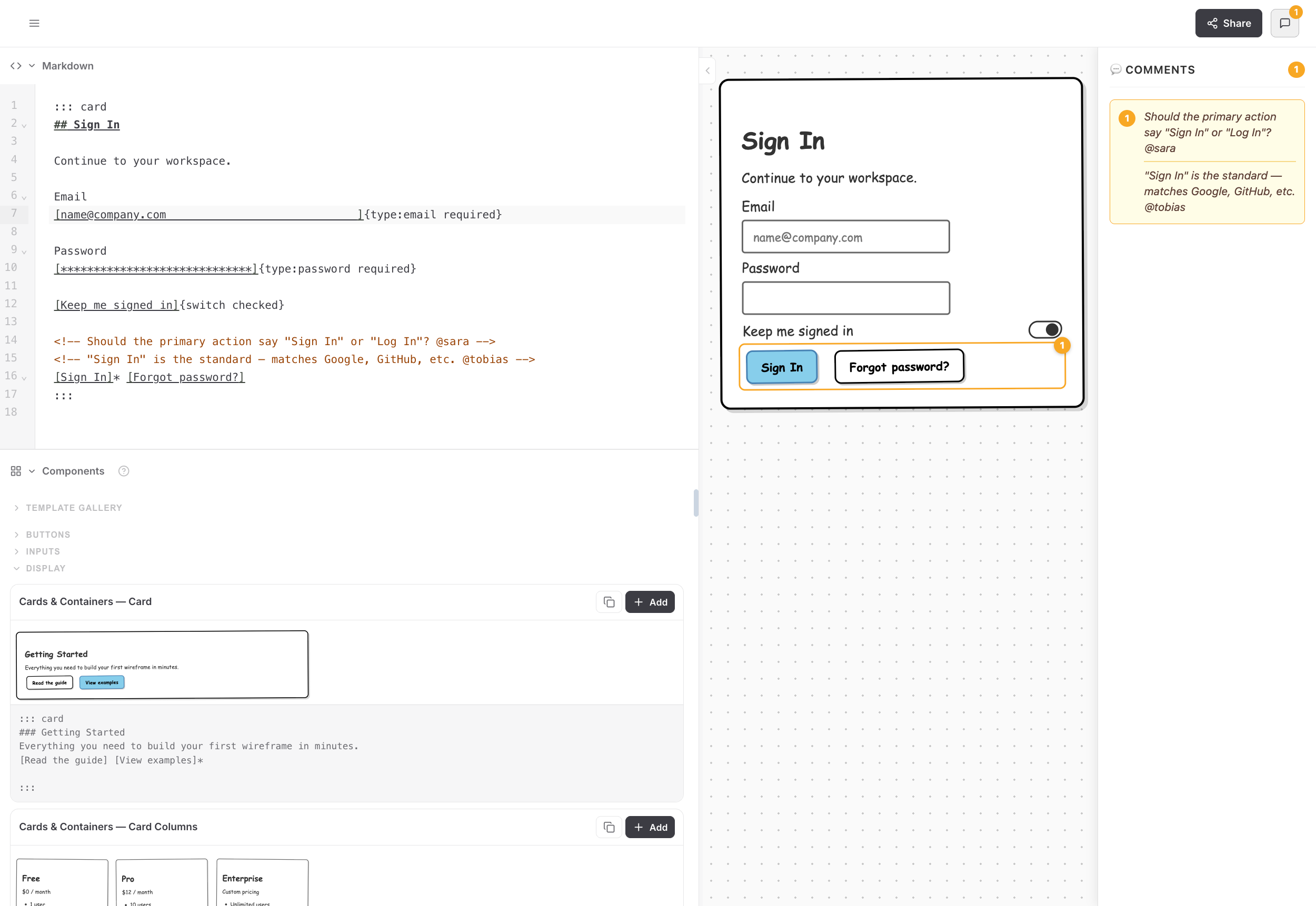
Select editor when Claude asks for a mode. Claude writes a .md file, the browser editor opens it — and from that point both sides can edit. Claude edits the file and the browser updates live; you edit in the browser and Claude can read your changes too.
Works with Claude Code or Claude Desktop (Cowork) running on the same machine as your browser.
 Claude Desktop
· Claude Code
wireframe.mdlive sync Browser
editor
How it works
- Ask Claude to wireframe something
- Claude writes the
.mdfile and gives you a browser link - Open the link in Chrome, Edge, or Safari 16.4+ → click Open File → grant access once
- The wireframe appears and updates live as Claude edits
- You can also type directly in the browser editor — changes save back to the file
Modes
| Mode | Use when |
|---|---|
| editor | Default — File System Access API, Chrome/Edge/Safari |
| serve | Firefox or any browser — starts a local hot-reload server and prints the address |
| display | You want a rendered HTML artifact instead of a live browser tab |
What you can ask
- "Wireframe a login screen with email, password, and a forgot password link"
- "Sketch the settings page for this app"
- "Draw what the dashboard would look like — nav, a metrics row, a table below"
- "Mockup a confirmation modal for deleting an account"
- "Document this component as a wireframe" (with a React/JSX file open)
Iterating
Keep talking — Claude edits the .md file and the preview updates live:
- "Add a sidebar with navigation links on the left"
- "Replace the table with a card columns"
- "Show the empty state — no items yet, with an Add button"
- "What does the mobile layout look like?"
Mode 3 — Only Editor
No install, no Claude skill needed. Ask Claude (in any chat) to write wiremd Markdown, copy the output, and paste it into the editor. Pick a style — renders instantly.
Tips
- Be specific about layout. "Two-column layout, nav on the left, content on the right" works better than "a typical dashboard layout."
- Name the states you need. "Show the loading state for the Submit button" or "Add an error message under the email field."
- You don't need to know wiremd syntax. Describe what you want visually — Claude translates it.